Tutorials
Introduction
The power of the framework is in its design:
{{project.name}} does not render anything by itself, but provides a
framework and a lot of features to help you rendering what you need !
That's the big difference with other tools: you won't never be limited to what the
framework provides !
Of course, there are a lot of cool and useful already
existing extensions, and you can build
complete games and applications just with them:
- image
- animated sprites
- button
- webview
- particle system
- text
- square, circle, ellipse, line, polygon, ...
- tab menu
- color picker
- …
What is the CGSGNode class ?
The CGSGNode class is the base class for any displayed items on the screen.
Everything in the graph is a CGSGNode or inherit from it (ie: is an extension):
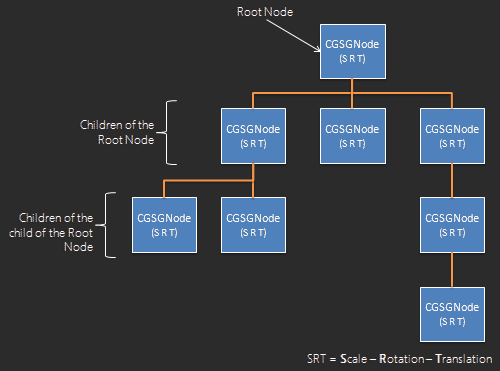
Here is a non-exhaustive list of properties and methods that a custom node (also called "extension" or "plugin") will inherit.
Main properties of CGSGNode:
- isDraggable
- isResizable
- isVisible
- isTraversable
- globalAlpha
- bkColors[]
- name
- isSelected (read only)
- rotationCenter
- position (read only)
- dimension (read only)
- scale (read only)
- rotation (read only)
- onClick
- onDblClick
- onDrag
- onDragEnd
- onResize
- onResizeEnd
- onSelect
- onDeselect
- …
Main methods of CGSGNode:
- render (context)
- setSelected (isSelected)
- pickNode (mousePosition, absoluteScale, ghostContext, recursively, condition)
- translateTo, translateWith, translateBy
- resizeTo, resizeWith, resizeBy
- scaleTo, scaleWith, scaleBy
- rotateTo, rotateWith, rotateBy
- addChild (newNode)
- addChildAt (newNode, index)
- removeChild (node, searchRecursively)
- detachChildAt (index)
- detachChild (childNode)
- setRegionConstraint (region)
- getAbsolutePosition ()
- getAbsoluteScale ()
- getAbsoluteRotation ()li>
- getAbsoluteLeft, getAbsoluteRight, getAbsoluteTop, getAbsoluteBottom, getAbsoluteWidth, getAbsoluteHeight
- getWidth, getHeight
- isColliding, getListOfCollidingBrothers, isCollidingABrother
- …
How to extend the CGSGNode class ?
{{project.name}} is an OOP tool, so to inherit from CGSGNode, a class has to extend
CGSGNode.
This is done simply like this:
var CustomNode = CGSGNode.extend(
    {
        //constructor.
        // You can specify any parameters you need
        initialize : function(x, y, width, height) {
            //CGSGNode constructor takes only 2 parameters: x & y
			this._super(x, y);

            //resize your node if needed
			this.resizeTo(width, height);

			/**
			 * @property classType
			 * @readonly
			 * @type {String}
			 */
			this.classType = "CustomNode";

            //add all other attributes you need
            ...
		},

        /**
         * Custom rendering.
         * You must define this method and declare inside what is the rendering loop
         *  for this node.
         * Here we will just draw a square
         * @method render
         * @override
         * @protected
         * @param {CanvasRenderingContext2D} context the context into render the node
         * */
        render:function (ctx) {
			/**
             * Set color for this zone.
             * Colors are managed with CSS and are stored into "this.bkgcolors" attribute, which is an array.
             * Following lines are already managed by the framework and are set here just as an example.
             */
			//ctx.globalAlpha = this.globalAlpha;
            //if (!cgsgExist(this.bkgcolors[1])) {
            //    ctx.fillStyle = this.bkgcolors[0];
            //}
            //else {
            //    var gradient = ctx.createLinearGradient(0, 0, 0, this.dimension.height);
            //    for (var i = 0, len = this.bkgcolors.length ; i < len ; i++)
            //        gradient.addColorStop(i, this.bkgcolors[i]);
            //    ctx.fillStyle = gradient;
            //}
            //
            //if (this.lineWidth > 0) {
            //    ctx.strokeStyle = this.lineColor;
            //    ctx.lineWidth = this.lineWidth;
            //}
            //
            //this._applyShadow(ctx);

            //we draw the rect at (0,0) because the framework has already translated the context
            // to the correct position
            ctx.fillRect(0, 0, this.dimension.width, this.dimension.height);

        },

        /**
         * Return a copy of this node
         * @method copy
         * @override
         * @return {CGSGNodeSquare} a copy of this node
         */
        copy:function () {
            var node = new CustomNode(this.position.x, this.position.y,
                                      this.dimension.width, this.dimension.height);
            //call the super method
            node = this._super(node);

            return node;
        }
    }
);
How to use your extension
Use your node as you use any node: by instanciating it :)
Example:
        createScene : function () {
            //first, define an arbitrary node as root node
            var rootNode = new CGSGNode(0, 0, 0, 0);
            this.sceneGraph.addNode(rootNode, null);

			//X, Y, WIDTH, HEIGHT
			var square = new CustomNode(20, 20, 150, 150);

            //you can use CGSGNode properties
			square.isDraggable = true;
			square.isResizable = true;
			square.globalAlpha = 0.8;

            //custom your node by overriding CSS declaration
			square.bkgcolors[0] = "lightgray";

            //add your square as child of the root node
			rootNode.addChild(square);

            //instanciate a second CustomNode
			var square2 = new CustomNode(200, 200, 20, 35);
            rootNode.addChild(square2);
		}
Full example : A "sky" node
A sky node is a good example, I think: complete, easy to understand and easy to extend to learn by yourself :)
            var SkyNode = CGSGNode.extend({
                initialize: function () {
                    this._super(0, 0);
                    //resize to full screen
                    this.resizeTo(CGSG.canvas.width, CGSG.canvas.height);

                    //we may want to add a yellow sun. Just add a yellow circle :)
                    var sun = new Circle(100, 100, 30); // centerX, centerY, radius
                    this.addChild(sun);

                    //add a bit of optimization by avoiding useless event on it
                    this.isTraversable = false;
                    // because we won't never modify the display of our node, put it in cache
                    this.setPrecomputed(true);
                },

                render: function (context) {
                    // a sky is a gradient from blue (top) to white (bottom)
                    var gradient = context.createLinearGradient(0, 0, 0, this.dimension.height);
                    gradient.addColorStop(0, "#48A9FF");
                    gradient.addColorStop(1, "#FFFFFF");
                    context.fillStyle = gradient;
                    //if we use CSS, we may just remove the 4 lines above and just declare CSS style something like:
                    //CSS file:
                    //.sky {
                    //    background: -webkit-linear-gradient(#FFFFFF, #48A9FF); /* For Safari */
                    //    background: -o-linear-gradient(#FFFFFF, #48A9FF); /* For Opera 11.1 to 12.0 */
                    //    background: -moz-linear-gradient(#FFFFFF, #48A9FF); /* For Firefox 3.6 to 15 */
                    //    background: linear-gradient(#FFFFFF, #48A9FF); /* Standard syntax */
                    //}
                    //
                    // main.js file:
                    //skyNode.setClass("sky");

                    //fill the entire canvas
                    context.fillRect(0, 0, this.dimension.width, this.dimension.height);
                }
            });
I let you have a look at the code of "Catch Flowers" game on same repo on GitHub to see a more complete and powerful sky (switch between day and night, ...).