


Create a simple project
cgSceneGraph is an object oriented framework and there are 2 (slightly identical) ways to develop an application with the framework :
- The basic one : instanciate the framework and play with the variable created
- The object one : create a class that inherit from the framework, and develop your code inside
I prefer the second one. It let you keep an oriented object code in all your project.
The basic way (I don't like it)
                        <html>
                        <head>
                            <meta charset="UTF-8"/>
                            <meta http-equiv="Content-type" content="text/html;charset=UTF-8"/>
                            <!-- avoid moving the view with finger on touch screens -->
                            <meta name="viewport"
                                  content="width = device-width, initial-scale = 1, minimum-scale = 1, maximum-scale = 1, user-scalable = no"/>

                            <!-- the framework -->
                            <script type="text/javascript" src="js/cgscenegraph_1.2.1.min.js"></script>
                        </head>

                        <body>

                        <!-- Define the canvas -->
                        <canvas id="sceneCanvas" width="400" height="400">
                            Your browser does not support the canvas element.
                        </canvas>

                        <!-- Instanciate your main class, which inherit from CGSGScene -->
                        <script type="text/javascript">
                            var canvasScene = document.getElementById("sceneCanvas");
                            var game = new CGSGScene(canvasScene);

                            createScene();

                            //start to play !
                            game.startPlaying();

                            /**
                             * Just create a single node (a square node)
                             */
                            function createScene () {
                                //create a square node : x, y, width, height
                                var squareNode = new CGSGNodeSquare(60, 20, 200, 200);
                                //add some nice properties
                                squareNode.isResizable = true;
                                squareNode.isDraggable = true;

                                //add the square node as the root of the graph
                                game.sceneGraph.addNode(squareNode, null);
                            }
                        </script>
                        </body>
                        </html>
2nd way : create your main class (the good one !)
Your project has to provide at least 2 files:- A HTML file to encapsulate the <canvas> tag :)
- A main javascript class which inherit from CGSGScene, the main entry point of the framework
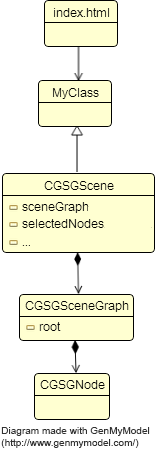
By inheriting from CGSGScene, your main class will encapsulate all properties and methods of the framework, letting your file as clean as possible.
The HTML file
The HTML file has to encapsulate a <canvas> tag, with an id, and to instanciate the JavaScript Main class:
                        <html>
                        <head>
                            <meta charset="UTF-8"/>
                            <meta http-equiv="Content-type" content="text/html;charset=UTF-8"/>
                            <!-- avoid moving the view with finger on touch screens -->
                            <meta name="viewport"
                                  content="width = device-width, initial-scale = 1, minimum-scale = 1, maximum-scale = 1, user-scalable = no"/>

                            <!-- the framework -->
                            <script type="text/javascript" src="js/cgscenegraph_1.2.1.min.js"></script>
                            <!-- your main class -->
                            <script type="text/javascript" src="js/mainApp.js"></script>

                        </head>

                        <body>

                        <!-- Define the canvas -->
                        <canvas id="sceneCanvas" width="400" height="400">
                            Your browser does not support the canvas element.
                        </canvas>

                        <!-- Instanciate your main class, which inherit from CGSGScene -->
                        <script type="text/javascript">
                            var canvasScene = document.getElementById("sceneCanvas");
                            var game = new App(canvasScene);
                        </script>
                        </body>
                        </html>
The Main JavaScript class (mainApp.js)
/*
To create a new class that inherit from a class "Parent":
    var MyClass = Parent.extend(
    {
        //constructor :
        initialize : function(param1, param2) {
            //each properties defined with "this." is global to the class
            this.x = param1;
        },

        myMethod : function(x) {
        }
    }
    );

Then, to instanciate it:
	var instance = new MyClass(23, 54);
*/
var App = CGSGScene.extend(
	{
		// 'initialize' is the constructor. It takes here 1 parameter : a handler to the canvas HTMLElement
		initialize : function (canvas) {
			//call constructor of the parent : CGSGScene
			this._super(canvas);

			//Fill the graph with your nodes
			this.createScene();

			//start to play !
            //this method is from the framework
			this.startPlaying();
		},

		/**
		 * Just create a single node (a square node)
		 * @method createScene
		 */
		createScene : function () {
			//create a square node : x, y, width, height
			var squareNode = new CGSGNodeSquare(60, 20, 200, 200);
			//add some nice properties
			squareNode.isResizable = true;
			squareNode.isDraggable = true;

        // !!! never use squareNode.position.x = n;
        // use squareNode.translateTo(n, m) method instead (or .translateWith(x, y) or .translateBy(x, y)
        //
        // In the same way, do not use node.rotation.angle = x, node.scale.x = x neither node.dimension?width=w
        // always use the rotateBy, rotateWith, rotateTo, scaleBy, scaleWith, scaleTo, resizeWith, resizeBy, resizeTo methods.

			//add the square node as the root of the graph
			this.sceneGraph.addNode(squareNode, null);
		}

	}
);
No more to do. Easy, no ? :)